
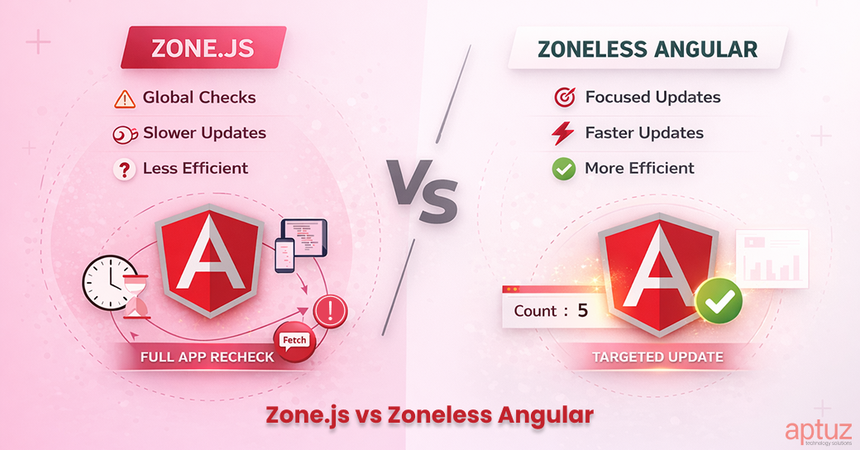
Introduction: Why Change Detection Matters
If you’ve ever wondered why Angular sometimes feels too eager to update the DOM, or why debugging random change detection cycles can be tricky, you’re not alone. Until now, Angular has relied on Zone.js to manage change detection automatically.
But with Angular 20, we enter a new era: Zoneless Angular. This feature removes the dependency on Zone.js, giving developers smaller bundles, better performance, and more control.
In this article, you’ll learn:
- How change detection worked before
- Why Zone.js caused overhead
- How Signals replace global detection
- How to migrate safely
- Best practices for zoneless applications
How Angular Used to Work (With Zone.js)
Zone.js in Action
Before Angular 20, Zone.js was essentially Angular’s “change detection engine trigger.”
It worked by monkey-patching core browser APIs — meaning it would override native APIs like:
- setTimeout, setInterval
- Promise.then
- XMLHttpRequest / fetch
- DOM events (click, input, etc.)
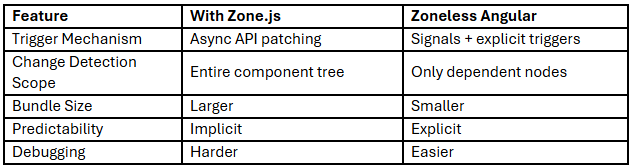
Whenever these async operations finished, Zone.js would automatically notify Angular that “something might have changed.” Angular would then run change detection for the entire component tree, ensuring the UI was always up to date.
Example: Angular Before v20 (With Zone.js)
// app/counter.component.ts (Angular pre-v20)
@Component({
  selector: 'app-counter',
  template: `
    <p>Count: {{ count }}</p>
    <button (click)="increment()">Increment</button>
  `
})
export class CounterComponent {
  count = 0;

  increment() {
    this.count++; // Zone.js auto-triggers change detection
  }
}
Without Zone.js, Angular would not automatically detect that count changed.
You would need:
this.cdRef.detectChanges();
Simplified Flow (With Zone.js)
User Click
↓
Browser Event
↓
Zone.js intercepts
↓
Angular runs global change detection
↓
DOM updates
Problems With Zone.js
- Bundle Size: Zone.js adds ~100KB.
- Performance Overhead: Every async operation was monitored.
- Unpredictability: Change detection could fire when you didn’t expect it.
- Debugging Complexity: Hard to know why a component re-rendered.
- Memory Leaks: Zones sometimes retained references too long.
Zone.js made Angular convenient—but not predictable.
Angular 20: The Zoneless Revolution
With Angular 20, Zone.js is no longer a dependency. Instead of monkey-patching all browser APIs, Angular embraces fine-grained reactivity and manual change detection when needed. This gives developers performance, predictability, and control without losing the ergonomic developer experience.
Signals: Built-in Reactivity
Angular 20 introduces signals as a first-class reactive primitive (similar to what you see in SolidJS or Vue’s reactivity system).
When a signal changes, Angular updates only the parts of the template that depend on it.
Example: Angular 20+ with Signals
// app/counter.component.ts (Angular 20+)
@Component({
  selector: 'app-counter',
  template: `
    <p>Count: {{ count() }}</p>
    <button (click)="increment()">Increment</button>
  `
})
export class CounterComponent {
  count = signal(0);  // reactive state

  increment() {
    this.count.update(c => c + 1);
    // Any template that reads count() auto-updates,
    // no Zone.js patching required
  }
}
Key points:
- signal(0) creates a reactive value.
- You read signals with count() instead of count.
- When updated, Angular knows exactly what to update in the DOM — no global change detection sweep.
- This makes UI updates surgical and efficient, instead of “check everything on the page.”
Explicit Control with Change Detection
There are still cases where you need manual control — for example, when dealing with external async APIs, legacy libraries, or non-signal-based updates.
Example: Manual Change Detection
@Component({
  selector: 'app-data',
  changeDetection: ChangeDetectionStrategy.OnPush
})
export class DataComponent {
  data: any;

  constructor(private http: HttpClient, private cdr: ChangeDetectorRef) {}

  async fetchData() {
    this.data = await this.http.get('/api/data').toPromise();
    this.cdr.detectChanges();
    // Manually tell Angular: "I’ve got new data, update the DOM now"
  }
}
Key points:
- ChangeDetectionStrategy.OnPush means Angular will only update when you tell it to, or when inputs change.
- ChangeDetectorRef.detectChanges() is now the manual trigger instead of Zones.
Zone.js vs Zoneless Angular (Comparison)
Benefits of Zoneless Angular
1. Smaller Bundle Size
# Angular 19 with Zone.js
ng build --prod → ~500KB

# Angular 20 Zoneless
ng build --prod → ~400KB
That’s around a 20% reduction in many apps.
2. Faster and More Predictable Performance
- No unnecessary cycles.
- Lower memory usage.
- Faster startup times.
3. More Control for Developers
You decide when change detection should run:
- Use signals for automatic reactive updates.
- Use ChangeDetectorRef for manual control.
4. Better Debugging
You’ll know exactly when and why a component updates—making performance tuning much simpler.
Migrating to Zoneless Angular
Step 1: Update to Angular 20
ng update @angular/core@20 @angular/cli@20
Step 2: Remove Zone.js
// package.json
"dependencies": {
  // Remove this
  // "zone.js": "^0.13.0"
}
Step 3: Update main.ts
Before (with Zone.js)
import 'zone.js';
import { bootstrapApplication } from '@angular/platform-browser';
import { AppComponent } from './app/app.component';

bootstrapApplication(AppComponent);
After (Zoneless)
import { bootstrapApplication } from '@angular/platform-browser';
import { AppComponent } from './app/app.component';

bootstrapApplication(AppComponent);

// No Zone.js import needed
Step 4: Refactor Components
Option 1: Use Signals (Recommended)
@Component({
  selector: 'app-user-list',
  template: `
    <div *ngFor="let user of users()">
      {{ user.name }} - {{ user.email }}
    </div>
  `
})
export class UserListComponent {
  users = signal<User[]>([]);

  async ngOnInit() {
    const data = await this.userService.getUsers().toPromise();
    this.users.set(data);
  }
}
Option 2: Manual Control
@Component({
  selector: 'app-data-table',
  changeDetection: ChangeDetectionStrategy.OnPush
})
export class DataTableComponent {
  data: any[] = [];

  constructor(private cdr: ChangeDetectorRef) {}

  async refreshData() {
    this.data = await this.dataService.fetchData().toPromise();
    this.cdr.detectChanges();
  }
}
Best Practices for Zoneless Angular
1. Use signals for reactive state
user = signal<User | null>(null);
isLoading = signal(false);

displayName = computed(() => {
  const u = this.user();
  return u ? `${u.firstName} ${u.lastName}` : 'Guest';
});
2. Use OnPush by Default
Improves predictability and performance.
3. Be Explicit with Async Work
- Use signals
- Or call detectChanges()
4. Test Async Flows Carefully
Change detection is no longer implicit.
Common Pitfalls
Problem: No UI Update
setTimeout(() => {
  this.value = 'updated'; // UI won’t refresh
}, 1000);
Fix: Manual trigger
setTimeout(() => {
  this.value = 'updated';
  this.cdr.detectChanges();
}, 1000);
Or use signals
this.value.set('updated');
What’s Next for Angular Change Detection
- Stronger Signal APIs for more expressive reactive programming.
- Compiler-level optimizations for tree-shaking and dead code elimination.
- Built-in profiling tools for change detection performance.
- Hybrid approaches combining automatic + manual control for flexibility.
Conclusion: Why This Matters
Angular 20 removes Zone.js and replaces global change detection with:
- Targeted reactive updates
- Explicit developer control
- More predictable rendering
If you’re starting a new Angular application, consider going zoneless from day one.
If you’re migrating an existing app:
- Introduce signals gradually
- Adopt OnPush
- Remove Zone.js incrementally
- Measure performance impact
Zoneless Angular represents a shift toward modern, explicit reactivity — without sacrificing developer ergonomics.