
Introduction
Imagine working with two PostgreSQL databases. You need to retrieve data from both, but copying or synchronizing data between them adds unnecessary complexity.
What if you could query data from another database directly using SQL, without moving it into your local database?
This is where PostgreSQL Foreign Data Wrappers (FDW) come in.
FDWs allow PostgreSQL to connect to external data sources and access their data through foreign tables. In this article, we'll explore how FDWs work, how foreign tables are configured, and how to query remote data using SQL.
What Is a Foreign Data Wrapper (FDW) in PostgreSQL?
A Foreign Data Wrapper (FDW) is a plugin that enables PostgreSQL to communicate with external systems, such as other databases, CSV files, or APIs.
Think of it as a translator or bridge that allows PostgreSQL to understand and interact with different data sources.
With FDW, you can:
- Connect to external databases
- Define external schemas locally
- Query remote data using standard SQL
FDW is modular, meaning each type of external system requires a specific wrapper (for example, postgres_fdw, mysql_fdw).
What Are Foreign Tables in PostgreSQL?
A Foreign Table is a table definition in PostgreSQL that represents data stored outside the database.
Unlike regular tables:
- Data is not stored locally
- It references external data
- Queries are executed on the remote system
This allows developers to work with external data in a familiar table-like structure, making integration straightforward.
How Do Foreign Data Wrappers Work? (Architecture Overview)
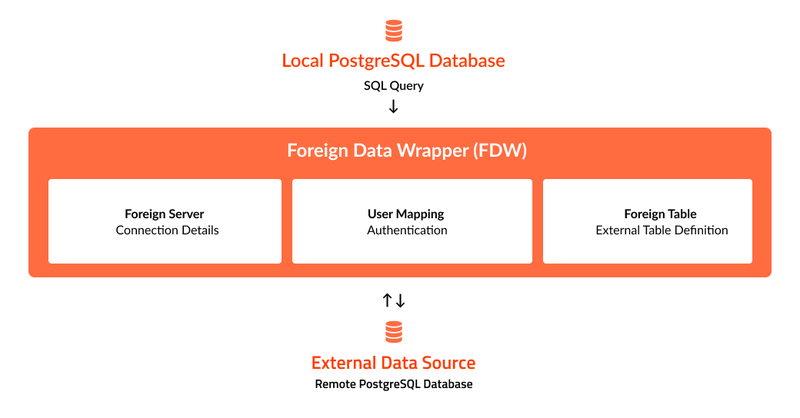
FDW operates through a few key components:
- Foreign Data Wrapper
Defines how PostgreSQL communicates with the external source. - Foreign Server
Stores connection details (host, port, database name). - User Mapping
Manages authentication for the remote system. - Foreign Table
Represents the external data structure inside PostgreSQL.
How to Set Up postgres_fdw in PostgreSQL
Step 1: Enable the postgres_fdw Extension
First, enable the postgres_fdw extension in your local PostgreSQL database. This extension allows PostgreSQL to connect to and query other PostgreSQL databases.
CREATE EXTENSION postgres_fdw;
Step 2: Create a Foreign Server
Next, define the connection to the remote PostgreSQL database using CREATE SERVER.
CREATE SERVER remote_server
FOREIGN DATA WRAPPER postgres_fdw
OPTIONS (
host 'localhost',
dbname 'remote_db',
port '5432'
);
The foreign server stores the connection details, including the host, database name, and port.
Step 3: Configure User Mapping
Create a user mapping to specify the credentials PostgreSQL will use to access the remote database.
CREATE USER MAPPING FOR CURRENT_USER
SERVER remote_server
OPTIONS (
   user 'remote_user',
   password 'password'
);
The user mapping associates the current PostgreSQL user with the credentials required to connect to the remote database.
Step 4: Create a Foreign Table
Define a foreign table in the local database that represents the remote employees table.
CREATE FOREIGN TABLE remote_employees (
id INT,
name TEXT,
 salary NUMERIC,
 department_id INT
)
SERVER remote_server
OPTIONS (
    table_name 'employees'
);
The foreign table provides a local table-like structure for accessing employee data stored in the remote database.
How to Query Foreign Tables Using SQL
Once the foreign table is configured, you can query remote data using standard SQL. You can also combine foreign tables with local tables.
Query Data from a Foreign Table
The following query retrieves employees whose salaries exceed 50,000.
SELECT *
FROM remote_employees
WHERE salary > 50000;
Join Local and Foreign Tables
You can also perform JOIN operations between local and foreign tables.
SELECT
   d.name AS department,
   e.name AS employee,
   e.salary
FROM departments d
JOIN remote_employees e
   ON d.id = e.department_id;
This query combines the local departments table with the foreign remote_employees table to retrieve department names, employee names, and salaries in a single result.
When Should You Use Foreign Data Wrappers?
Foreign Data Wrappers are particularly useful when you need to access data across multiple systems without maintaining separate copies.
Common use cases include:
- Cross-database access: Query data from multiple databases through a single PostgreSQL database.
- Database migration: Access data from existing systems while gradually transitioning to a new database.
- Read-focused operations: Retrieve external data without regularly modifying it.
- Reporting and analytics: Combine data from different sources to generate reports.
When Are Foreign Data Wrappers Not Ideal?
Although FDWs simplify access to external data, they may not be suitable for every scenario.
Consider their limitations when:
- Frequent updates or transactions are involved: Workloads requiring continuous data modifications may need a different approach.
- Strict consistency is required: Maintaining consistency across multiple systems can introduce additional complexity.
- Large remote datasets are involved: Joining large datasets across databases may affect query performance.
Conclusion
PostgreSQL Foreign Data Wrappers provide a practical way to access and query data across multiple databases without copying it into a single location.
By configuring a foreign server, user mapping, and foreign tables, developers can work with remote data using familiar SQL queries. This makes FDWs particularly useful for cross-database reporting, data integration, and gradual system migrations.
However, factors such as query performance, transaction requirements, and data consistency should be considered before implementing FDWs.
If you're working with data spread across multiple PostgreSQL databases, experimenting with postgres_fdw in a development environment is a useful starting point.