
How a Simple Request Slowly Grows Into a Scalable Backend
You click a button. A response appears. It feels like one tiny action, but behind that moment, a request can pass through several layers before the user ever sees the result.
If one server can answer a request, why do real systems need DNS, load balancers, reverse proxies, middleware, caches, CDNs, queues, and workers?
The answer is surprisingly simple: these technologies are not added because engineers want complicated architecture. They appear when a system meets a new problem.
In this article, we'll follow a request through an evolving backend and see what problem each new architectural component is designed to solve.
The Journey Begins With Almost Nothing
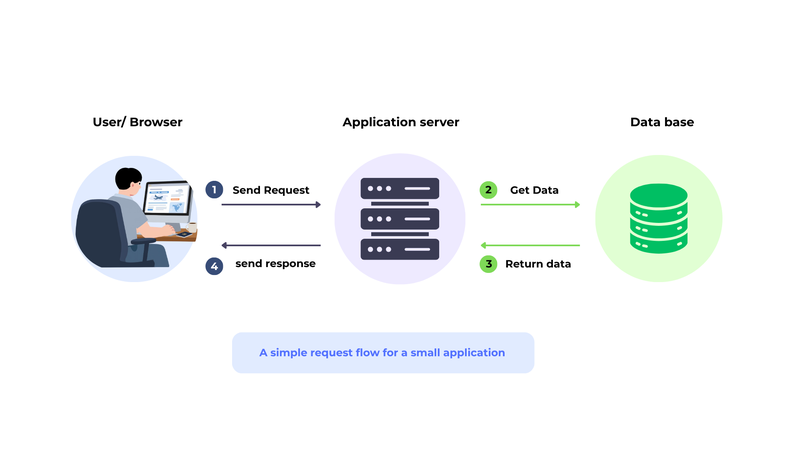
Imagine a small backend application:
- One server receives the request.
- The application runs its business logic.
- The application talks to the database.
- The server sends the response back to the user.
For a small application, this can be completely reasonable. Then something changes: the application becomes useful.
More users arrive. Requests begin happening at the same time. The question is no longer:
“Can the server answer a request?”
It becomes:
“Can the system keep answering thousands of requests reliably?”
First Mystery: Where Does the Request Even Go?
A user thinks in names such as example.com. The network needs an address. DNS—the Domain Name System—helps translate the human-friendly domain name into the address needed to reach the service.
- User knows a domain name.
- DNS resolves that name to the destination address.
- The request can now begin its journey toward the backend.
Key idea: Scalability starts before your application code runs. The request first has to find the system.
But finding the server is only the beginning. If one machine cannot handle the growing traffic, the architecture needs another answer: how should the workload be shared?
When One Server Is No Longer Enough
Adding servers sounds easy: if one server handles 1,000 requests, why not add another? The moment you do, a new problem appears—who decides which server receives each request?
Load Balancer: The Traffic Coordinator
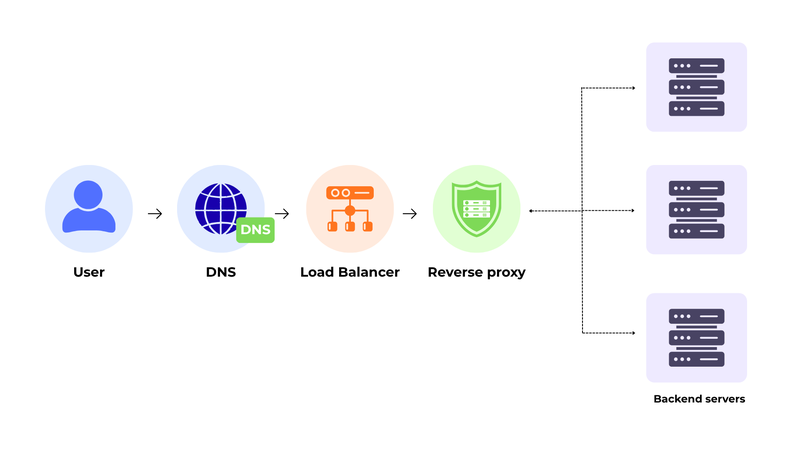
A load balancer sits in front of multiple servers and distributes incoming requests across available capacity.
- Round Robin: sends requests in sequence.
- Least Connections: prefers a server with fewer active connections.
- Weighted Routing: sends more traffic to servers with greater capacity.
- Health Checks: avoids sending requests to unhealthy servers.
- Latency-aware choices: can consider which destination is responding faster.
Interesting shift: The load balancer does not make the application smarter. It prevents one machine from becoming the obvious bottleneck.
But Should Every Internal Service Be Public?
As the system grows, there may be many internal services. Exposing every service directly makes the architecture harder to control. A reverse proxy creates a controlled public entry point.
Reverse Proxy: The Front Door
- Clients communicate with one public entry point.
- The proxy decides where an accepted request should go.
- Routing can depend on paths, domains, headers, or configured rules.
- It can also handle responsibilities such as TLS termination and request inspection.
A user-related request might be routed to a user service while a payment-related request goes somewhere else. The client does not need to understand the internal structure.
Middleware: The Repeated Work Detector
Many endpoints repeatedly need the same work:
- Authentication checks
- Validation
- Logging
- Adding information to request context
- Stopping invalid requests early
Middleware provides a reusable place for these cross-cutting concerns. Instead of copying the same logic into every endpoint, common processing can happen around the request/response lifecycle.
Design lesson: Good architecture often means moving repeated work to the right layer, not simply writing more code.
The system can now distribute traffic and control its entrance. But what happens when traffic suddenly becomes too aggressive?
When Traffic, Failures, and Slowness Fight Back
A system can be correctly designed and still struggle. Traffic can arrive in bursts. A client can send too many requests. A service can fail. Or nothing can be broken at all. The system may simply be too slow.
Rate Limiting vs. Throttling
These two ideas are related, but they answer different questions:
- Rate limiting: How much traffic is allowed?
- Throttling: How fast should traffic or work be processed?
Both can protect resources from unexpected or abusive traffic and reduce the chance that one client overwhelms the service.
Easy memory trick: Rate = amount. Throttle = speed.
Logging: Giving the System a Memory
Imagine a user says, “My request failed.”
The system contains several components and database operations. If there are no useful records, the developer may know only that the final response was an error.
Useful logs can help reconstruct what happened:
- Which request arrived?
- Which component handled it?
- What important events occurred?
- Where did the failure happen?
- What sequence of events led to the error?
Without logs: A failure is a mystery. With logs, a failure becomes an investigation.
Cache: Stop Doing the Same Expensive Work
Suppose thousands of users request the same frequently used information. If every request goes to the database, the database repeatedly performs work for the same result.
- Cache stores frequently accessed data in a faster place.
- Later requests can sometimes be answered without another database query.
- Database load can decrease.
- Response time can improve.
The cache does not replace the database. It reduces unnecessary repeated work.
CDN: Shorten the Physical Journey
Static assets—images, files, scripts, and similar content—do not always need to travel from one central backend to every user. A CDN can distribute copies closer to users.
- Cache mainly avoids repeated work or repeated data retrieval.
- CDN mainly brings static content closer to the user.
- Together, they can make the system feel much faster under load.
Yet some work is inherently slow. Sending emails, generating reports, processing files, or calling external services may still take time. The final problem is therefore not only speed—it is waiting.
When the Request Shouldn't Have to Wait
Imagine a report-generation request. The user clicks “Generate.” The application starts processing the file, creates the report, sends an email, or calls another service. If the request waits for all of that work to finish, the user experiences the entire delay.
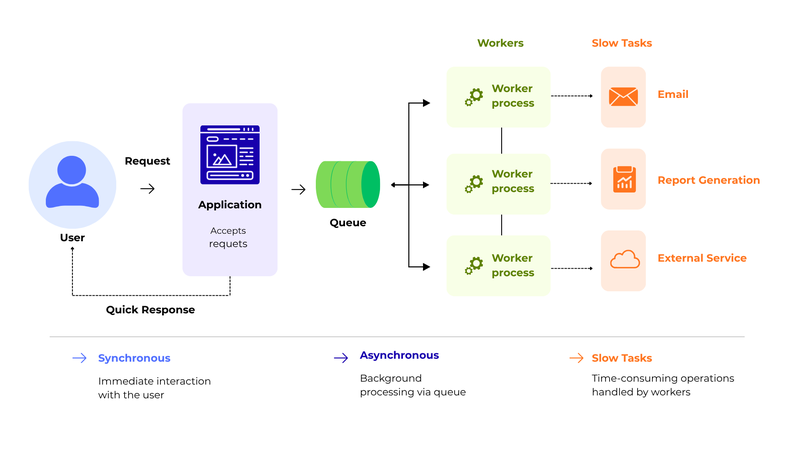
Queue and Workers: Moving Slow Work to the Background
Background processing changes the question.
The system can accept the request, place the slow work into a queue, and respond quickly. A background worker can process the queued task independently.
- The request path stays focused on responding to the user.
- The queue provides a place for work to wait.
- Workers take tasks from the queue.
- Long-running operations can continue without keeping the user's request open.
The user experience changes from: “Wait until everything finishes” → “Your request was accepted; the remaining work can continue.”
The Hidden Journey, Now Visible
A mature backend may therefore look conceptually like this:
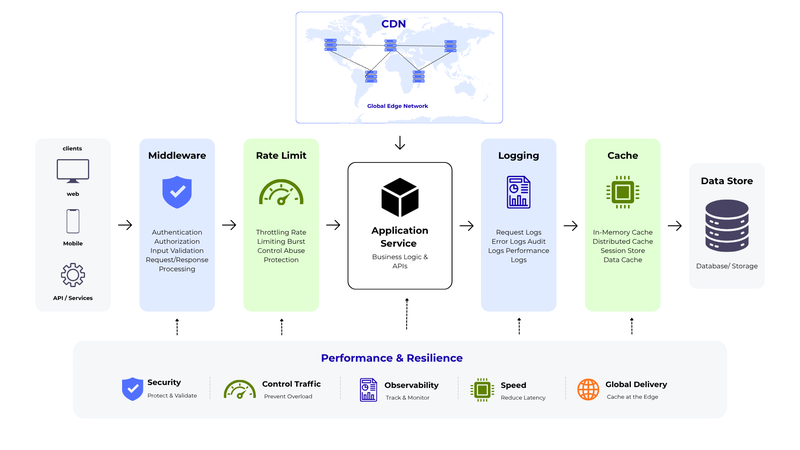
DNS → Load Balancer → Reverse Proxy → Middleware → Application
Supporting that request journey are additional architectural components:
- DNS → finds the destination.
- Load Balancer → distributes traffic across healthy capacity.
- Reverse Proxy → provides a controlled public entry point.
- Middleware → handles common request/response concerns.
- Rate Limiting / Throttling → controls traffic pressure.
- Logging → records what happened.
- Cache → avoids repeated expensive work.
- CDN → delivers static content closer to users.
- Queue + Workers → move slow work away from the main request path.
The Most Important Lesson
When learning system design, it is tempting to memorize a list of technologies.
But the more useful question is:
“What problem forced this component to exist?”
- More users → more capacity and traffic distribution.
- More services → controlled routing and a public entry point.
- Repeated request concerns → middleware.
- Traffic bursts → rate limiting and throttling.
- Hard-to-understand failures → logging.
- Repeated data access → caching.
- Users far from static content → CDN.
- Slow operations → queues and background workers.
Final Realization: Scalable architecture is not a collection of tools. It is a story of problems and the decisions made to solve them.
The user still sees something simple: click a button, receive a response.
The complexity remains mostly invisible. That is the point.
Good architecture hides unnecessary complexity from the user while giving the system the capacity, control, speed, and resilience it needs.
So the next time a website responds in a fraction of a second, remember: the click may be tiny, but the journey behind it can be enormous.