
When building applications on AWS, one of the first architectural decisions you’ll face is choosing between Amazon RDS for PostgreSQL and Amazon Aurora PostgreSQL.
At a surface level, Aurora appears to be just another engine option within RDS. Technically, that’s correct. However, once you examine the underlying architecture, scaling model, and performance characteristics, it becomes clear that Aurora operates very differently from standard RDS PostgreSQL.
What is AWS RDS?
Amazon Relational Database Service (RDS) is AWS’s managed service for running traditional relational databases in the cloud.
Instead of manually provisioning servers, configuring storage, managing backups, patching the OS, and handling maintenance tasks, RDS automates these operational responsibilities.
With RDS, you:
- Choose a database engine (PostgreSQL, MySQL, MariaDB, Oracle, or SQL Server)
- Select an instance type (CPU and memory configuration)
- Configure storage and networking settings
AWS then provisions and manages the database instance for you.
In simple terms:
RDS = Managed, instance-based traditional databases.
What is AWS Aurora RDS?
Amazon Aurora is also offered within RDS, but it uses a fundamentally different architecture.
Aurora is a cloud-native database engine built by AWS. It is wire-compatible with PostgreSQL and MySQL, meaning existing applications and drivers continue to work without modification.
However, internally, Aurora is redesigned for cloud environments.
Key Architectural Differences
- Storage is decoupled from compute
- Data is automatically replicated six times across three Availability Zones
- Storage automatically scales up to 128 TB
- Failover is significantly faster due to distributed storage design
This architecture allows Aurora to provide:
- Higher durability
- Improved availability
- Better scaling under high concurrency
In short:
Aurora = Distributed, cloud-native PostgreSQL architecture built for scalability and resilience.
Serverless & On-Demand Scaling
Have you ever had that unexpected day when traffic suddenly spikes?
With traditional RDS, you choose a fixed instance size. If traffic grows beyond capacity, you either:
- Over-provision in advance (and pay more), or
- Scale up reactively and hope users don’t feel the impact
This is where Aurora Serverless changes the game.
Instead of picking a fixed instance size, you define a capacity range. Aurora then adjusts compute resources automatically based on demand.
Understanding ACU (Aurora Capacity Units)
Aurora Serverless uses ACUs (Aurora Capacity Units) to measure capacity.
- 1 ACU ≈ 2 GB of memory
- CPU and networking scale proportionally with memory
When configuring Aurora Serverless, you don’t select “db.r5.large” or “db.t4g.xlarge.”
Instead, you define:
- Minimum ACU
- Maximum ACU

Aurora automatically scales up or down within that range depending on workload intensity.
So when traffic increases, capacity increases.
When traffic drops, capacity scales down.
Aurora Deployment Options
If you choose Aurora, you also decide between two pricing models:

Aurora Standard
- Balanced pricing model
- Suitable for most general workloads
- Traditional provisioned cluster setup
Aurora I/O-Optimized
- Designed for I/O-heavy workloads
- Eliminates per-I/O charges
- Often more cost-effective for applications with high read/write volumes
If your application generates a high number of IOPS, the I/O-Optimized configuration can reduce overall storage costs while maintaining performance.
Aurora isn’t just managed PostgreSQL running on an instance.
It’s a distributed database architecture built specifically for cloud-scale workloads.
RDS vs Aurora RDS: Head-to-Head
Now comes the real question:
If you’re running PostgreSQL on AWS, should you choose RDS or Aurora?
Let’s compare them across the areas that actually matter in production environments.
1. Architecture & Storage
RDS
RDS follows a traditional architecture:
- One primary instance
- Optional read replicas
- Storage attached to the instance
- Storage size configured upfront
If you need more storage, you modify the instance configuration. While storage scaling is supported, the architecture is still instance-centric.
Aurora
Aurora uses a distributed storage architecture:
- Storage is separated from compute
- Data is replicated six times across three Availability Zones
- Storage automatically scales up to 128 TB
- Faster failover due to shared storage layer
You don’t manage storage growth manually — it expands as your data grows.
Winner: Aurora
Its distributed, cloud-native architecture provides stronger durability and scalability.
2. Scalability
RDS
Scaling is mostly vertical:
- Move to a larger instance for more CPU/RAM
- Add read replicas for read scaling
- Manual scaling decisions required
This works well for predictable workloads, but requires planning.
Aurora
Aurora supports both:
- Vertical scaling (larger instances)
- Horizontal scaling (reader endpoints)
- Serverless auto-scaling (ACU-based)
With Aurora Serverless, capacity automatically adjusts within your defined ACU range based on workload demand.
Winner: Aurora (especially with Serverless)
3. Performance
RDS
- Standard PostgreSQL engine
- Predictable performance
- Strong for steady-state workloads
Aurora
AWS claims up to 3–5x higher throughput compared to standard PostgreSQL under certain conditions.
Why?
- Distributed storage engine
- Optimized replication
- Reduced write amplification
- Faster crash recovery
If your workload is I/O-heavy or highly concurrent, Aurora typically handles scaling more efficiently.
Winner: Aurora
Particularly under high concurrency or IOPS-heavy workload
4. Pricing
RDS
- Pay for instance + storage
- Straightforward and predictable
- Generally lower base cost
Best suited for:
- Stable workloads
- Budget-conscious environments
- Internal tools and moderate traffic apps
Aurora
- Higher instance pricing
- Storage priced differently
- Serverless charges per ACU usage
- I/O-Optimized option for heavy read/write workloads
Aurora can become cost-efficient when:
- Traffic is unpredictable (Serverless advantage)
- I/O volume is high (I/O-Optimized model)
Winner: It depends.
Predictable workload → RDS. Spiky or high-I/O workload → Aurora
5. Complexity & Use Cases
RDS
- Feels like standard PostgreSQL
- Easier migrations from on-prem
- Simpler mental model
- Good for small to medium workloads
Aurora
- Built-in high availability
- Faster failover
- Reader endpoints
- Global Database support
- Better long-term scalability
Aurora shines in:
- Mission-critical systems
- Customer-facing applications
- High-concurrency environments
- Multi-region architectures
Winner: Tie
RDS wins for simplicity. Aurora wins for scalability and resilience
Benchmark: Aurora Postgres vs RDS Postgres (Provisioned)
Enough theory. Let’s look at some real numbers.
Now I'm goanna spun up two RDS instances - one running vanilla Postgres and the other Aurora Postgres - both on the same instance type. Then, I ran pgbench to put them under stress and capture the performance stats for a fair comparison. Same playground, same rules—let’s see who wins!
To keep things fair, I spun up:
- RDS Postgres (Single AZ)
- Aurora Postgres (Writer-only)
- Both running Postgres 16.6
Important note: To properly compare, you must use the same version of Postgres on both sides.
I tested with different instance types, client counts (-c), and job counts (-j) using pgbench. The results below show transactions processed, average latency, and transactions per second (TPS).
And before we dive in, remember:
Aurora Serverless runs on Aurora Capacity Units (ACUs). When you choose ACUs equivalent to the vCPU + RAM of these instance types, you’ll see similar performance.
Instance Type: db.t4g.large (2 vCPU, 8 GB RAM)

On smaller instances, RDS Postgres edges out Aurora. Aurora’s distributed architecture adds overhead at this scale.
Instance Type: db.r5.2xlarge (8 vCPU, 64 GB RAM)
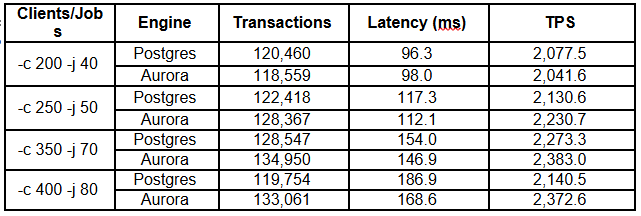
At mid-tier instances, Aurora catches up and often surpasses RDS under heavier concurrency.
Instance Type: db.r5.4xlarge (16 vCPU, 128 GB RAM)
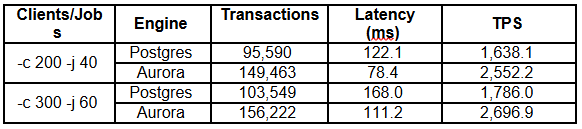
With more CPU and memory, Aurora really starts to shine, driving significantly higher throughput.
Instance Type: db.r5.8xlarge (32 vCPU, 256 GB RAM)
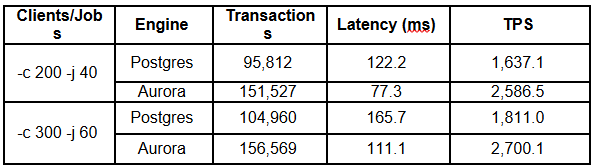
On large instances, Aurora consistently outperforms RDS, especially as concurrency increases.
Conclusion: Which One Should You Choose?
If you’re deciding between RDS Postgres and Aurora Postgres, here’s the honest answer:
Both are strong options — but they’re optimized for different workload patterns.
The real question isn’t “Which one is better?”
It’s “Which one fits my workload?”
Go with RDS Postgres if…
- Your workload is small to medium and doesn’t push too many connections.
- You want something that’s simple, predictable, and cost-effective.
- Your traffic is steady, without big spikes.
- You mostly run OLAP-style queries (scanning large datasets) where RDS can sometimes be faster.
Go with Aurora Postgres (Provisioned or Serverless) if…
- You expect high concurrency (hundreds of clients hitting the DB at once).
- You need a database that can scale up seamlessly as your business grows.
- You’re running mission-critical apps where downtime isn’t an option (Aurora’s failover is faster).
- Your workload is spiky or unpredictable → in that case, Aurora Serverless is the sweet spot since it auto-adjusts capacity.
- You’re working on apps that need global reach (Aurora Global Database helps here).
Think of it like this:
- RDS is the dependable workhorse → simple, cost-friendly, reliable.
- Aurora is a sports car → built for scale, performance, and resilience.
If you’re running a smaller internal application or a workload with stable traffic, RDS will serve you well.
If you’re building a high-traffic product, expecting growth, or operating in an environment where downtime and scaling delays are unacceptable, Aurora is often worth the additional cost.
Final Takeaway
There’s no universal winner.
- Stable workload + cost sensitivity → RDS
- High concurrency + scaling requirements → Aurora
The right decision comes down to balancing:
- Performance needs
- Availability requirements
- Traffic predictability
- Budget constraints
Choose the engine that aligns with your workload profile — not just the one with the bigger feature list.